Table of Contents
🧺 Laundry Rooms
There are two laundry rooms (A-side & B-side). Both work the same way and have 5 washing machines and 5 dryers.
- Washing: 2 € (~1.5 hours)
- Drying: 1 € (~1.5–2 hours)
- Use coins! Banknotes may cause problems with change.
🧼 How to Wash
- ⚠️ Check the machine first! Make sure the rubber door seal is properly in place and not loose or damaged. Otherwise, the laundry room could flood! Do NOT use a damaged machine! flag them in the app!
- Check the payment terminal: blinking = machine unlocked, unusable.
- Put your laundry in the machine and add detergent (see below).
- Choose a washing program.
- Press START → Wait for “ERROR”.
- Insert 2 € and select your machine number at the payment terminal.
- Wait for 0.00 € (or until the machine unlocks).
- Press START again to begin washing.
⚠️ IMPORTANT: Always trigger “ERROR” BEFORE paying, otherwise you might lose your money! Ignore the outdated instructions on the machines.
🧴 How Much Detergent?
- Washing powder: About 4 small shot glasses (2 cl each = 80 ml) for a normal load.
- Liquid detergent: Check the bottle for the correct amount (usually different from powder).
- Where? Put detergent ONLY in compartment II.
- Too complicated? Use 1 laundry pod (check packaging). Put it directly into the empty drum before adding clothes.
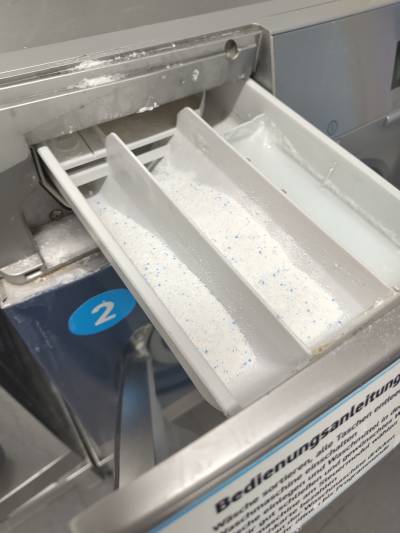
- ⚠️ NEVER fill the detergent drawer completely! Too much detergent can damage the machines.
- Changed your mind? Remove any unused detergent!
⚠️ Dosage varies by product, load size and water hardness. Always check the packaging!
❌ WRONG – Too much detergent:
📺 First time washing clothes? Watch a beginner tutorial on YouTube.
⚠️ Our washing machines use a special payment system! Videos only explain the basics. Always follow the instructions above for starting and paying!
🌬️ How to Dry
- Put your laundry in the dryer and clean the lint filter.
- Press START → Wait for “ERROR”.
- Insert 1 € and select your dryer number at the payment terminal.
- Wait for 0.00 €.
- Choose a program, close the door and press START again.
⚠️ NEVER open the dryer while it's running! This ends your session, and you'll have to pay again.
🧹 Please Keep Things Clean
- Don't block machines: Set a timer and remove your laundry as soon as it's finished.
- Dryers: Clean the lint filter before and after use.
- Trash: Take your empty bottles, packaging and other large waste with you.
- Broken machine? Don't force it. Try another one.
📱 Laundry App
Check machine availability and help others by keeping the status updated:
More information: UnityDorm Home
ℹ️ Good to Know
- Best washing times: Weekdays. Weekend evenings are usually busy.
- Blinking machine: Temporarily unavailable. Choose another.
- “1 minute remaining”: Can sometimes take another 10–15 minutes.
- Maintenance (as of 12 November 2026): Maintenance is currently limited. Please treat the machines carefully to avoid unnecessary damage and costs for everyone.
- Repair service: 089 – 89146920
